
 English | EN
Introduction
Every organisation is building AI into their applications. Most are also discovering the same pattern: as AI workloads scale, the cost surface grows in ways that are easy to underestimate during the pilot phase.
The conversation usually starts with inference costs — the per-token charges that come with any hosted LLM, which scale directly with usage once a pilot moves beyond a handful of users. But when I dig deeper, the actual cost picture is almost always larger. There are embedding charges, CI/CD pipeline spend against live cloud databases, staging environments that mirror production at full cost, and the hidden productivity drain of slow developer inner loops that depend entirely on cloud connectivity.
This blog maps each hidden cost and shows exactly where each tool applies.
Overview: The Full Cost Surface
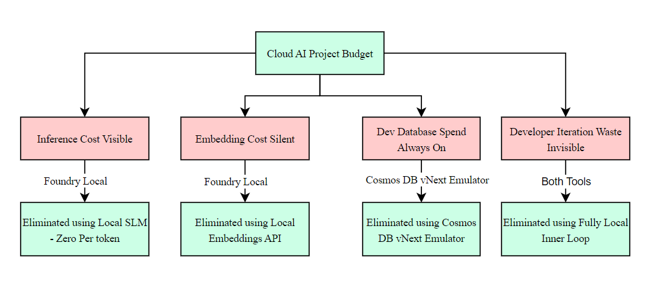
Cost layer 1 – Inference: The visible one
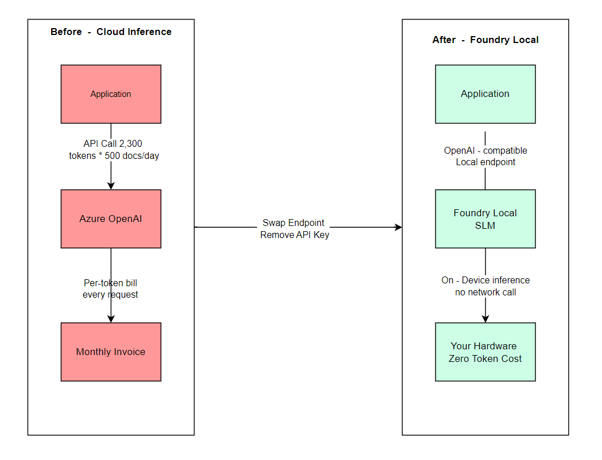
This is the one everyone talks about. Every call to Azure OpenAI or another hosted LLM carries a per-token charge — input tokens and output tokens billed separately. For a document summarisation pipeline processing 500 documents a day, with an average of 2,000 input tokens and 300 output tokens per document, the numbers accumulate quickly.
As AI moves into operational workflows — contract review, KYC processing, report generation — where volume is predictable and high, it’s worth evaluating which workloads are better suited to local inference.
What eliminates it: Foundry Local runs SLMs directly on the server or AI PC hardware within your infrastructure. The model runs locally. There is no API call to Azure OpenAI. There is no per-token charge. The cost of inference becomes the cost of the hardware, which is already accounted for in infrastructure budgets.
Foundry Local exposes an OpenAI-compatible API, so the application code change is minimal — swap the endpoint, remove the API key. The rest of the pipeline remains unchanged.
Cost layer 2 — Embeddings: The silent one
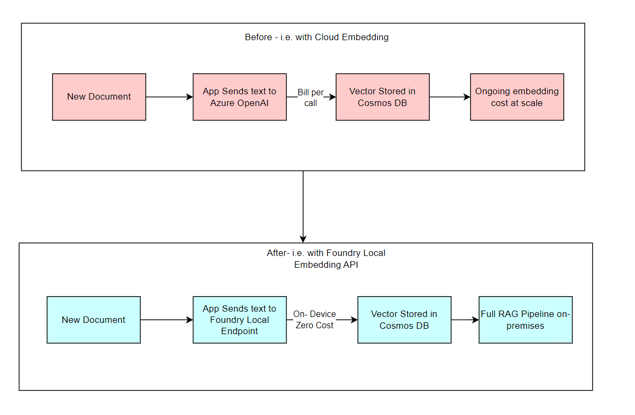
Vector search pipelines — RAG, semantic similarity, document deduplication — require every document to be converted into a vector embedding before it can be stored and queried. At scale, embedding generation is a separate, ongoing cloud cost that rarely gets its own line in a project estimate.
If your Cosmos DB container holds 100,000 documents and you re-index when models are updated, the embedding cost for that re-indexing run is not trivial. Neither is the ongoing cost of embedding newly ingested documents every day.
What eliminates it: Foundry Local 1.1 introduced a local Embeddings API. The same infrastructure running your SLM for summarisation can generate embeddings without a cloud round-trip. Combined with Cosmos DB’s vector index, the entire RAG pipeline —embed, store, retrieve — can run without a single call to an Azure OpenAI embedding endpoint.
Cost layer 3 — Development database spend: The always-on one
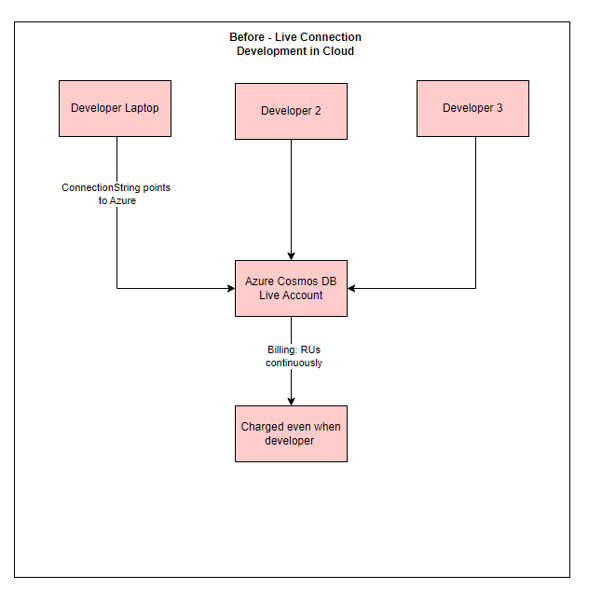
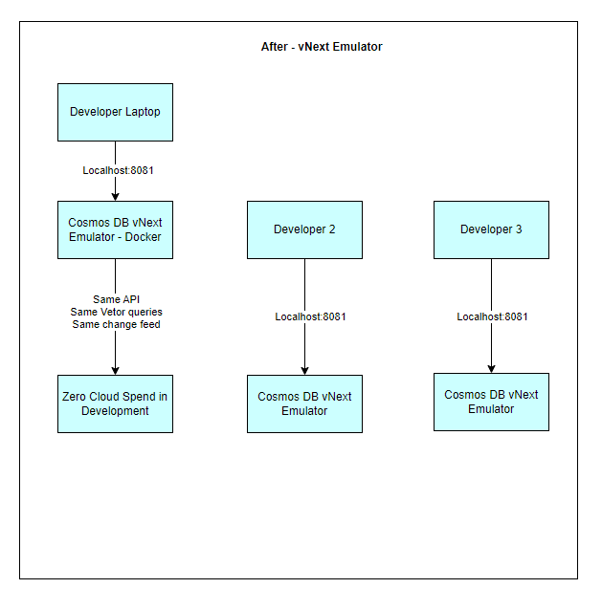
Most teams developing against Azure Cosmos DB point their local development environment at a live cloud database. This is understandable — the emulator options were historically limited, and teams did not want to deal with API parity gaps between local and cloud.
The consequence is that Cosmos DB Request Units (RU/s) are consumed continuously during working hours, regardless of whether active development is happening at that moment. A provisioned throughput Cosmos DB account runs around the clock, independent of actual usage patterns.
Multiply this across a team of eight developers over a six-month project, and the development environment Cosmos DB spend is a meaningful number — one that the vNext Emulator can largely eliminate.
What eliminates it: The Cosmos DB vNext Emulator runs as a Docker container on the developer’s machine. It supports the same NoSQL API, the same vector search queries, the same partition key semantics, and the same change feed as the cloud service. Developers iterate locally. The cloud account is used only for staging and production. Development environment Cosmos DB spend drops to zero.
Cost layer 4— Developer iteration waste: The invisible one
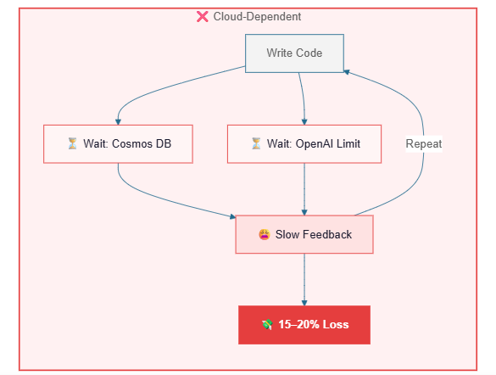
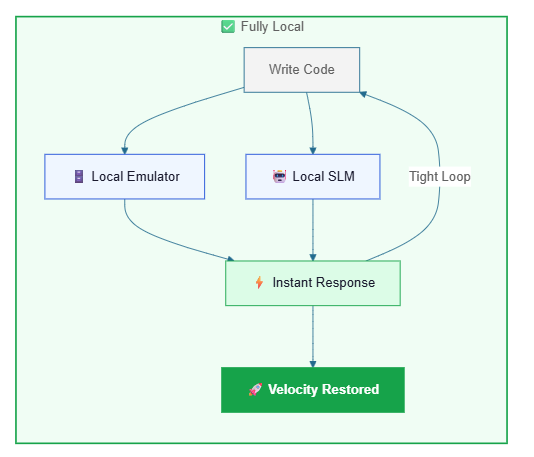
This one never appears on an Azure bill, which is why it is so easy to overlook. When developers depend entirely on cloud connectivity to iterate — waiting for a shared Cosmos DB to be available, queuing behind a rate-limited Azure OpenAI endpoint, or debugging against a live database that other team members are also writing to — the inner loop slows down.
Slow inner loops mean more time per feature, more context switching, and lower developer satisfaction. In a six-month project with a team of eight, even a 15% reduction in effective development velocity has a cost that far exceeds any Azure line item.
What addresses it: Both tools together. Foundry Local gives every developer a local AI inference runtime with no rate limits and no dependency on network connectivity. The vNext Emulator gives every developer an isolated, seeded database they control entirely. The inner loop becomes fully local — write code, run tests, see results — without waiting on anything external.
Conclusion
The cost of building AI applications on Azure is not just the inference bill. It is the embedding charges, the development environment database spend, the staging environment overhead, and the productivity loss from slow developer loops. These costs are real, they compound over a project’s lifetime, and most of them never appear as a single identifiable line item.
Foundry Local 1.2 and the Azure Cosmos DB vNext Emulator address different layers of this cost surface, and they address them without requiring architectural rewrites. The API contracts stay the same. The application logic stays the same. The infrastructure assumptions change.
The cost of cloud AI development is not fixed. It is a set of decisions, and several of the most expensive ones now have better alternatives.
References: Announcing General availability of the Azure Cosmos DB vNext emulator – Azure Cosmos DB Blog
Accelerate Edge AI Development with Foundry Local | Microsoft Foundry Blog